Compare Folder - My articles - Publisher - we share the fruits & happiness
Mo, 23 Nov 09, 11:38 Am
SEARCH_FORM$
Ebuy
 
We share Work & Happiness
在这里,分享成果和快乐

Main  Files   My articles

Compare Folder
[ ] 08 Oct 08, 8:35 Am
Compare Folder is a powerful, easy-to-use tool for comparing and updating folders. Compare Folder can compare the two folders with the all files' name, modified time, file size, attributes, and so on, and can update the difference between the two folders to make it exactly the same. Compare Folder support of the local folders, shared folders, and FTP virtual folder, text files can also compare the differences in content, so that your backup files and finishing work even more easily. Compare Folder is a green software, the extract can use when they do not need to delete the folder to direct. Free download address http://ebuy.ucoz.com. The newest stable version of Compare Folder is 3.3.
 
Basic Operation :
 
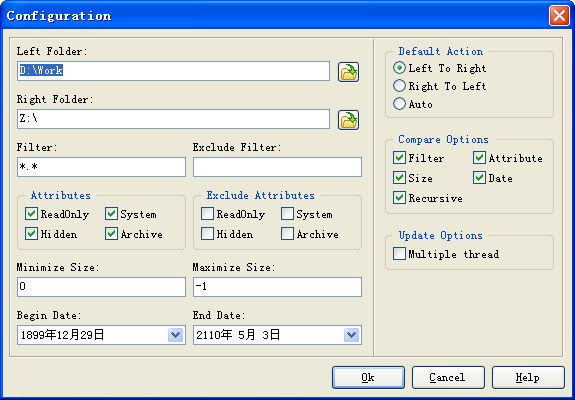
Configuration
 
 
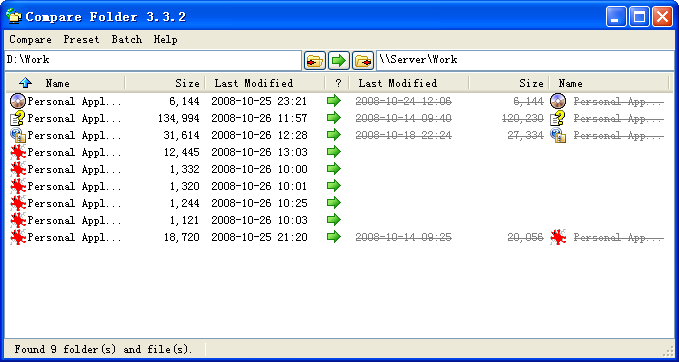
You can also quickly set the Left Folder, Right Folder and Default Action at the top of the main window as follows:
 
 
Left Folder, Right Folder----The folders for comparing, with absolute path format.
FTP virtual folder 's format is as follows:ftp://[username:password@]server[:port][/path]
 
Square brackets mean not required. e.g.
ftp://ftp.borland.com                      ftp://usr:pwd@ftp.borland.com
ftp://usr:pwd@ftp.borland.com:21   ftp://usr:pwd@ftp.borland.com:21/pub
 
File filer of name, seperating with semicolon. Wildcards is supported. e.g.    *.*;   *.dll;   *.ocx;   *.exe
 
Compare
 
Build the list of difference between setuped two folders. This process may take a few minutes, press ESC key to stop.
 
 
Update
 
Compare Folder has four Update features which is Update, Update Selection, Force Update and Force Update Selection. The Update process may take a few minutes, press ESC key to stop, but must wait until the current file update completly. Compare Folder execute Compare automatic after Update, so that you can see the new differences since last Compare.
 
There are a few actions for Update, as follows:
Exists in source folder but Not exists in destination folder --------------------------------------------- Copy to destination
Exists in both source folder and destination folder, but the modified time or size is different------- Overwrite the destination
Exists in both source foder and destination folder, but the attributes are different------------------- Set attributes of the destination
Not exists in source folder but exists in destination folder---------------------------------------------- Delete the destination
 
 
Show Differences
 
Compare the differences between two text file.
 
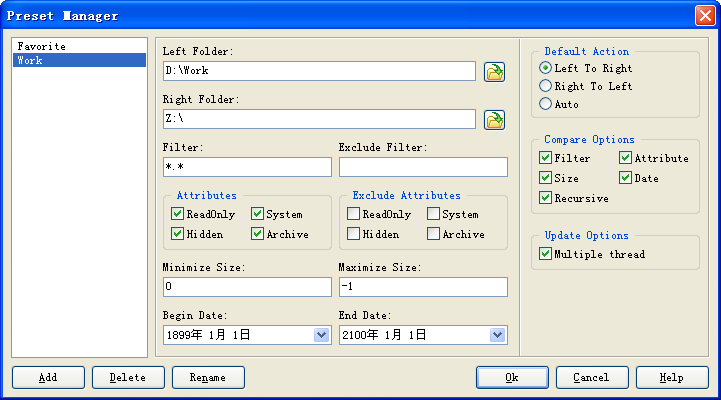
Presets allow you to switch configuration quickly.


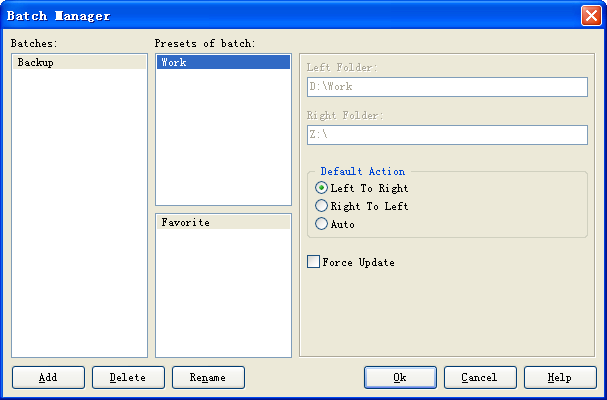
Batches allow you to execute several presets once.


Normal/Expert Mode
 
Update process is irreversible. In order to take into account convenience and security, Compare Folder introduces Normal Mode and Expert Mode.
 
 
Normal Mode:Presets Manager and Batches Manager is unavailable. Update require confirmation and Backup feature is available. Applicable to beginners and who has a special requiredment for data security. It's the default mode for Compare Folder.
Expert Mode:All features is available and Update does not require confirmation. The skilled user to seek maximum convenience can use Expert Mode. Enter Expert Mode directly with the command line parameter /e to run Compare Folder.
 
Shareware,free version exclude few function. Permanent Registeration Cost US$14.95
 
         Get Trial Register Now!
Category: My articles | Added by: ebuy
Views: 293 | Downloads: | Rating: 0.0/0 |
Total comments: 0
Catalog categories
My articles [5]
Login form
Welcome Guest!

E-mail:
Password:

Site friends
Create your own site

    Copyright MyCorp ? 2009 Site managed by uCoz system